Preview in:
Reverse image search has become valuable in many ways, with duplicate finders being one of them. Creative industries not only fight against copyright infringement but also want to see where their work is being used.
All you need is an image and an AI-powered tool that can search by image. Discover how lenso.ai can help you find image duplicates.
How does picture search with AI work? Check free AI reverse image search tools
Plagiarism image checker - lenso.ai
Lenso.ai can be the ultimate solution for you, especially if you need a plagiarism checker tool. It is a reverse image search tool that, among other features—such as face search and place finder—can help you search for duplicates and potential copyright infringements.
Here’s what you can do with lenso.ai:
Find duplicate images
If you are eager to find duplicates of specific images, simply upload an image to lenso.ai and check the matches in the “Duplicates” category.
.png?updatedAt=1742308500578)
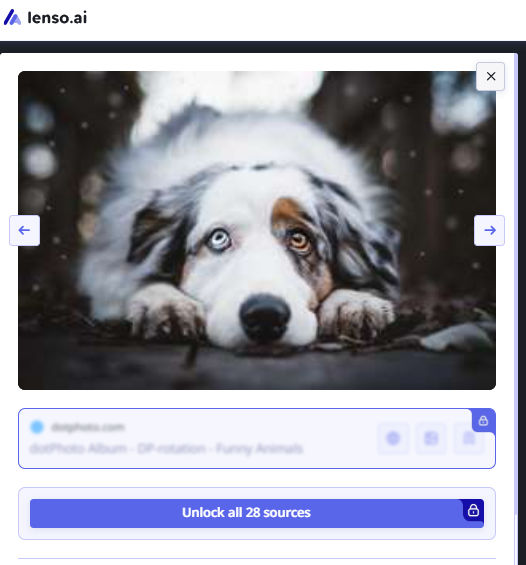
You will see images and URLs to the original sources, which can be helpful if you want to find the author of the image or find out where it was originally published.
Check potential copyright misuse
That is probably the main purpose of plagiarism image checkers. If you are the owner or author of an image (such as pictures or photos) and want to check for potential copyright misuse, simply upload an image of your work and review all available URLs in the “Duplicates” category.
.png?updatedAt=1742308460676)
This is the quickest way to find out where your work appears. If you detect copyright infringement, you can take action immediately or, if you’re pressed for time and need someone to do my assignment, tools like Lenso.ai can help you handle part of the research and verification efficiently.
Create alerts & monitor your work
Alerts can be a long-term solution for monitoring potential copyright misuse. Simply upload an image, check the “Duplicates” category, and click the “Alert” button. As soon as new duplicates of your image appear, you will receive an email notification.
.png?updatedAt=1742308393167)
This means you no longer have to manually search the internet to see where your work has been used.
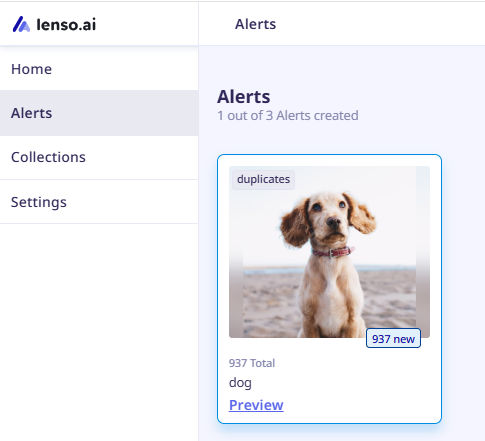
How to set up Alerts on lenso.ai?
Additionally, alerts can serve a positive purpose—enhancing your brand awareness. You can track all the places where your work has been published, helping you understand its reach and visibility.
Alternatives to lenso.ai
Best Image Copyright & Duplicate Finders – Top 3 Free Online Tools
If you want to compare different plagiarism image checkers, feel free to check out some alternatives to lenso.ai:
- Copyseeker
- TinEye
- Google Lens

Author
Julia Mykhailiuk
Marketing Specialist
Continue reading
General
Visual Product Education: 6 Ways Ecommerce Brands Can Use Images to Build Customer Confidence
High product understanding is a direct prerequisite for high purchase intent. That’s why ensuring your target audience understands your solutions and their value is essential for guiding them toward conversion. However, communicating product benefits can be slightly more challenging online than in-store.
General
The Best Reverse Image Search for Photographers. Set Up Copyright Notifications!
If you are a photographer looking for a smart way to find your copyrighted content shared online, this is the place for you! In this article, we will explain how you can search for your photos being reposted, and the best ways you can automate the searching.

General
Face Search API by lenso.ai for businesses: Top 5 Industries and use cases
If you run a business and wonder how to boost your user engagement or add a feature that may become a game changer – we do have a solution! You need to implement the face search API from lenso.ai. Check whether your use case may be a good fit for reverse face search integration.

General
How Teams Can Improve Their Image Search Skills with AI-Powered Tools
AI-powered visual tools are changing how photographers, digital marketers, content creators, and researchers work. In a single day, one person might trace the source of a photo, check a campaign image for duplicates, and look for similar visuals for a new project. The tools evolve quickly, and training often struggles to keep up.